

If your company manufactures or supplies industrial products or services, there is a good chance you already have a listing on IndustryNet. MNI's research team proactively identifies and verifies U.S. industrial suppliers regardless of whether they advertise, which means most qualified companies are already in the database. Claiming your listing gives you control over what buyers see when they find you.
This article explains what claiming your listing means, what it allows you to do as a free listing holder, and how to complete the process.
Explore more: What Is IndustryNet?
What Does It Mean to Claim Your Listing?
Every IndustryNet listing starts as a research-verified record maintained by MNI's team. That record includes your basic company information: name, location, product categories, and contact details. Claiming your listing connects that record to your personal IndustryNet account, giving you the ability to log in, manage your profile, and monitor buyer activity directly through the platform.
Claiming is free and does not require purchasing an enhanced listing. Suppliers can upgrade to a Preferred or Featured tier at any time after claiming, but there is real value in claiming even if you stay on a free listing.
How to Claim Your Listing
Claiming your IndustryNet listing takes only a few minutes.
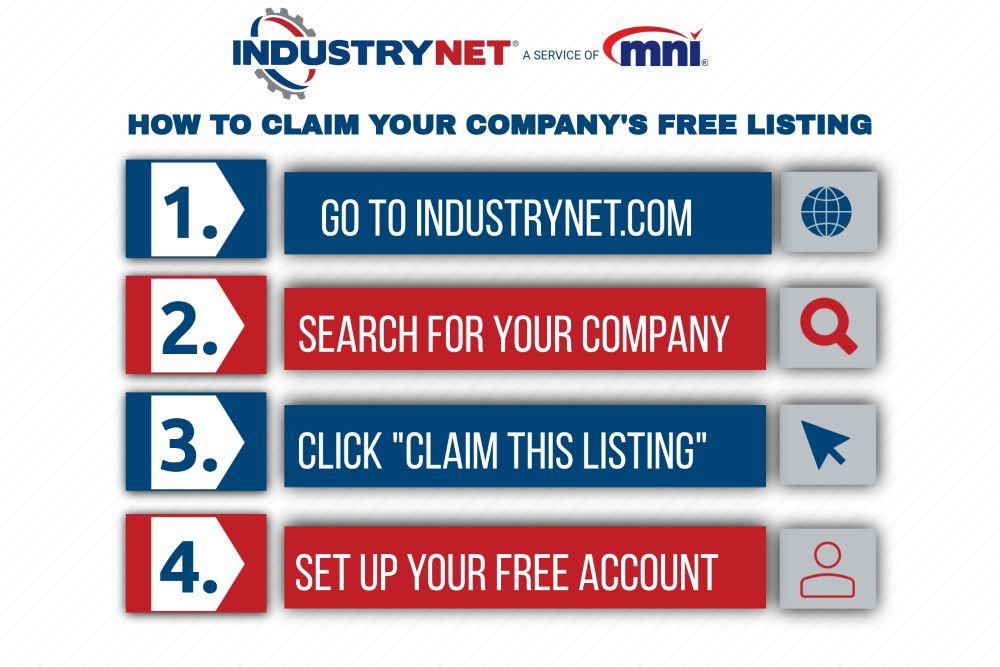
Step 1. Visit IndustryNet.com and type your company name into the search box. If your company name includes "Inc." or "LLC" at the end, there is no need to include that. On the results screen, scroll past the Products and Services section to the Companies section and locate your listing. If your company has multiple locations, you will see each one listed with its city and state.
Don't see your company? Many industrial businesses qualify for a free company profile in our database. If you don't see yours, you can add or update your profile here.
Step 2. Click on your company name to go to your listing page. Scroll all the way to the bottom and click the link that reads "Is this your business? Claim this listing for free to update your information."
Step 3. You will be prompted to log in to a free IndustryNet account or create one. This is your personal account for managing the listing. The information you enter during registration does not appear anywhere on IndustryNet and is not part of your company's public listing.
Step 4. Once your account is created and the claim is submitted, IndustryNet's MNI staff will verify that you are an authorized representative of the company. This typically takes one business day. In some cases MNI may contact the company by phone or email to confirm. Once approved, you will receive an email notification and your listing management icons will activate in your dashboard.
Multiple people at your company can claim the same listing. Each person creates their own free IndustryNet account and claims the listing independently. There is no limit to how many authorized managers a listing can have, and each manager can also manage an unlimited number of company listings from their account.
Watch how to claim your listing, step by step in the video below.
What Can You Do with a Claimed Free Listing?
Once your listing is approved, you can manage it directly from your IndustryNet dashboard. For free listings, this includes the following.
Update your MNI company profile
Your contact information, company name, address, phone, fax, email, and website are maintained in MNI's database. From your dashboard you can submit updates to MNI's editorial team for review. Changes typically go live within about a week after review.
Specify key company attributes
You can update your brand names, company type, ISO certifications, ownership type, and distribution scope directly through your listing dashboard. These are the same filters buyers use when searching for suppliers on IndustryNet, so keeping them accurate and complete improves how often your listing appears in relevant searches.
Upload your company logo
Free listings can upload a large logo that appears on your company's listing page. This is distinct from the small logo that appears in search results, which is available only on Featured listings.
View your activity report
Your dashboard includes a report showing the number of searches conducted in the categories under which your company is listed. Free listings can see basic category search activity. Additional stats, including the number of times your listing was viewed, website click-throughs, phone number views, direct inquiries, quote request downloads, and other engagement metrics, are available on Preferred and Featured listings.
What Becomes Available If You Upgrade?
Claiming your listing is the foundation. Upgrading to a Preferred or Featured listing builds on it, unlocking a significant set of additional profile features and placement benefits.
Profile features available on Preferred and Featured listings include a small logo that appears in category search results alongside your company name, cover art displayed at the top of your listing page, social media links, ability to upload PDF catalogs, brochures, a photo library, a video library, and the ability to publish and promote articles about your company on the IndustryNet blog. Enhanced listings also include Visitor Alerts, which notify you in real time when a buyer views your listing.
Beyond profile features, the most significant benefit of an enhanced listing is placement. Preferred and Featured suppliers appear above free listings in category search results, with their logo and a company description visible before a buyer ever clicks through. For a buyer scanning dozens or hundreds of results, that placement difference determines whether your listing gets seen at all.
If you upload profile elements such as your cover art, photos, or catalog while on a free listing, they will be saved and will go live automatically if and when you upgrade, without needing to be re-uploaded

Frequently Asked Questions About Claiming Your IndustryNet Listing
| Question | Answer |
|---|---|
| Is claiming an IndustryNet listing free? | Yes. Claiming your listing is free and does not require purchasing an enhanced tier. |
| Does my company already have a listing on IndustryNet? | Most qualified U.S. industrial suppliers do. Search by company name at IndustryNet.com to check. |
| How do I claim my IndustryNet listing? | Search for your company at IndustryNet.com, open your listing, and click "Claim this listing." |
| Can multiple people at my company manage the same listing? | Yes. Each person creates a free IndustryNet account and claims the listing independently. |
| Can I update my company's contact information after claiming? | Yes. Submit changes through your dashboard to MNI's team. Updates typically go live within a week. |
| How do I upgrade to a Preferred or Featured listing after claiming? | Visit industrynet.com/marketing or contact [email protected] or call 847-864-7590. |
The Bottom Line
Your IndustryNet listing is likely already live and visible to buyers searching your product categories. Claiming it is free, takes a few minutes, and gives you control over your company's profile, access to buyer inquiries, and visibility into how buyers are finding you. For suppliers not yet ready to invest in an enhanced listing, claiming is still the right first step. It ensures your information is accurate, your logo is in place, and no buyer inquiry goes unnoticed.
To claim your listing, visit IndustryNet.com and search for your company by name. Learn about Preferred and Featured listing options here or contact us.
